FeaturesWork breakdown structure
Work breakdown structure software that schedules itself
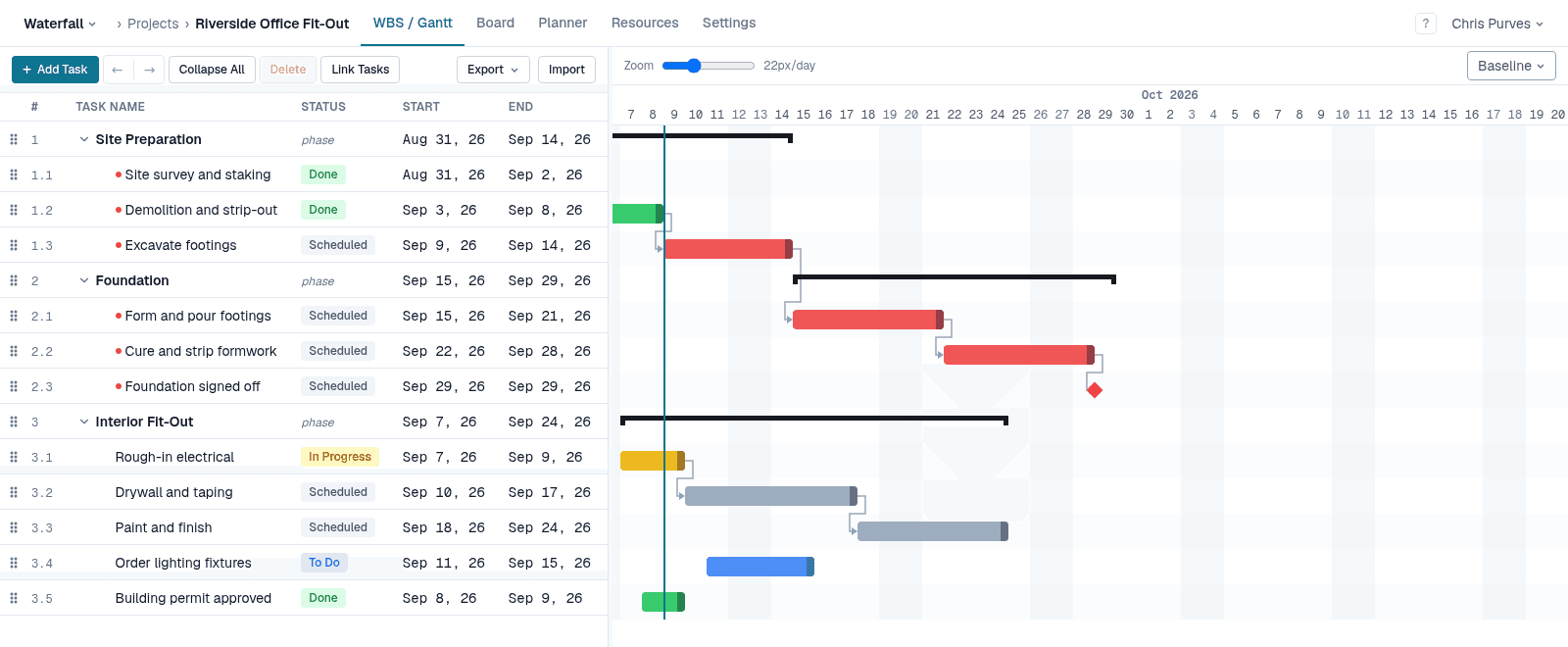
The work breakdown structure is the backbone of a waterfall plan: every deliverable split into phases, tasks and milestones until each piece is small enough to estimate. In Waterfall PM it is also the schedule — add a task, give it a duration and its predecessors, and the Gantt chart beside it places it.
Highlights
No depth limit
Phases inside phases, as deep as the work goes. Outline numbers (1.2.3) are kept up to date for you.
Phases roll up
A phase spans from its earliest child's start to its latest child's finish. You never type a phase's dates.
Keyboard first
Insert adds a row and puts you in its name, Tab and Shift+Tab indent and outdent, Alt+↑/↓ moves a task among its siblings, L links a selection.
Predecessors as text
Type 1.2FS+3d or 4SS straight into the Predecessors column — the notation Microsoft Project uses.
Durations your way
Enter 4h, 3d, 2w or 1m. Work-based scheduling, constraints and deadlines are a click away on the task card.
Spreadsheet in and out
Export the WBS to CSV, TSV or Excel, and import one back — replacing the plan or appending to it (Pro).
Build it the way you think
Start at the top — the deliverables — and break each one down. Drag rows to reorder them, select a range with Shift and indent it in one keystroke, or select two tasks and press L to link them. Structure, order and links never need the mouse.
A WBS that is also the schedule
Every leaf task carries a duration and its links, and the scheduler does the rest: start and finish dates, float, and the critical path, recalculated after every change. End dates are the scheduler's to own — type one and it becomes a duration, so the plan stays consistent.
Free while it's in beta
No credit card, every feature unlocked, and team members are always free. See pricing after the beta