FeaturesCritical path
Critical path scheduling, recomputed on every change
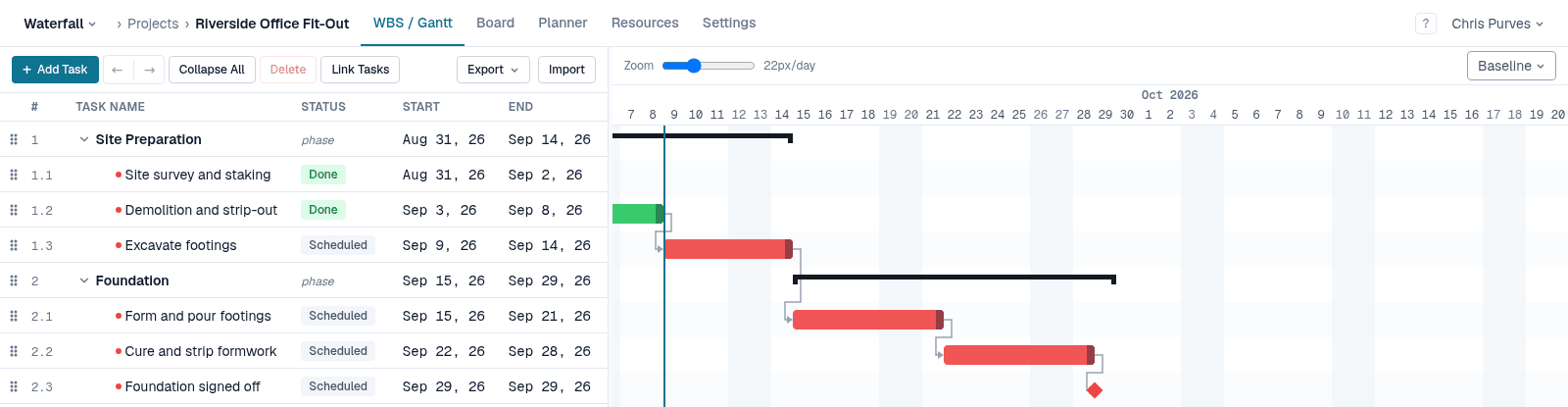
The critical path is the chain of tasks with no slack: if any of them slips, the finish date slips. Waterfall PM runs the critical path method over your plan after every edit, so the red chain on the Gantt chart is always the current one — not the one from when someone last pressed Recalculate.
Highlights
Forward and backward passes
Earliest and latest dates for every task, from all four dependency types and their lag.
Slack in working days
Slack is counted in working days, so a weekend or a holiday is never mistaken for room to slip.
Always current
Every change reschedules the plan and redraws the critical path — there is no manual recalculation.
Deadlines that point at the cause
When a deadline or a “finish no later than” date can't be met, it is flagged and every task feeding it turns critical.
Eight constraint types
ASAP, ALAP, SNET, SNLT, FNET, FNLT, MSO and MFO — Microsoft Project's full set.
Risk, not history
Critical tasks are highlighted until they are under way or done; finished work is no longer at risk.
Ceilings flag; they never shove
A “no later than” constraint or a deadline is a promise the plan can break. Waterfall PM never satisfies one by dragging a task in front of its own predecessors. It flags the date instead — “deadline missed” or “past its constraint” on the task — and every task feeding it turns critical, so you see the whole chain that has to shorten, not just the task that crossed the line.
Built for real calendars
Each project has its own working days, holidays and time zone. Dates, durations and float all respect them, and “today” is today where the project is — unstarted work is never scheduled in the past.
Free while it's in beta
No credit card, every feature unlocked, and team members are always free. See pricing after the beta