FeaturesTeam Planner
A team planner that shows who is actually overloaded
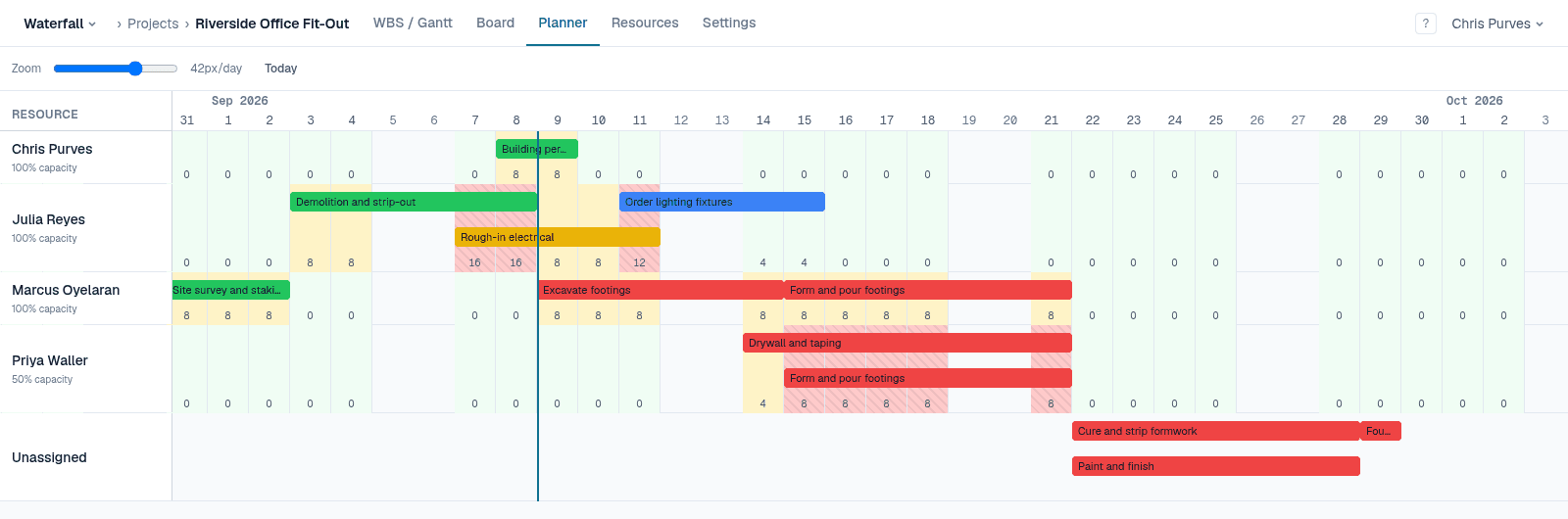
The Gantt chart answers “when”. The Team Planner answers “who”: the same tasks on the same timeline, one lane per person, with each day's allocated hours measured against what that person can actually do. It is part of Pro, and free for everyone during the beta.
Highlights
One lane per person
Every resource gets a swimlane, plus an Unassigned lane for work nobody has picked up yet.
Workload against capacity
Up to 80% is green, up to 100% amber, and over 100% red — so someone at half time reads as full at four hours, not eight.
Drag to reschedule
Move a bar sideways to change when it happens; it is pinned the same way a Gantt drag pins it.
Drag to reassign
Move a bar to another lane to hand the work over, at the same allocation.
See what's linked
Select a task and its predecessors and successors light up, even across different people's lanes.
Refuses the impossible
A move earlier than a predecessor or today allows is refused up front, rather than saved and ignored.
Allocation, not just assignment
Assign people at a percentage — 50% on one task, 100% on another — and give each person a capacity. The planner adds up each day's hours from every task they are on in the project, so double-booking shows up as a red day before it shows up as a missed date.
Switch a task to work-based scheduling and its duration follows the people on it: add a second person at full time and the task takes half as long.
Free while it's in beta
No credit card, every feature unlocked, and team members are always free. See pricing after the beta