CompareWaterfall PM vs Smartsheet
A Smartsheet alternative for plans that have to hold together
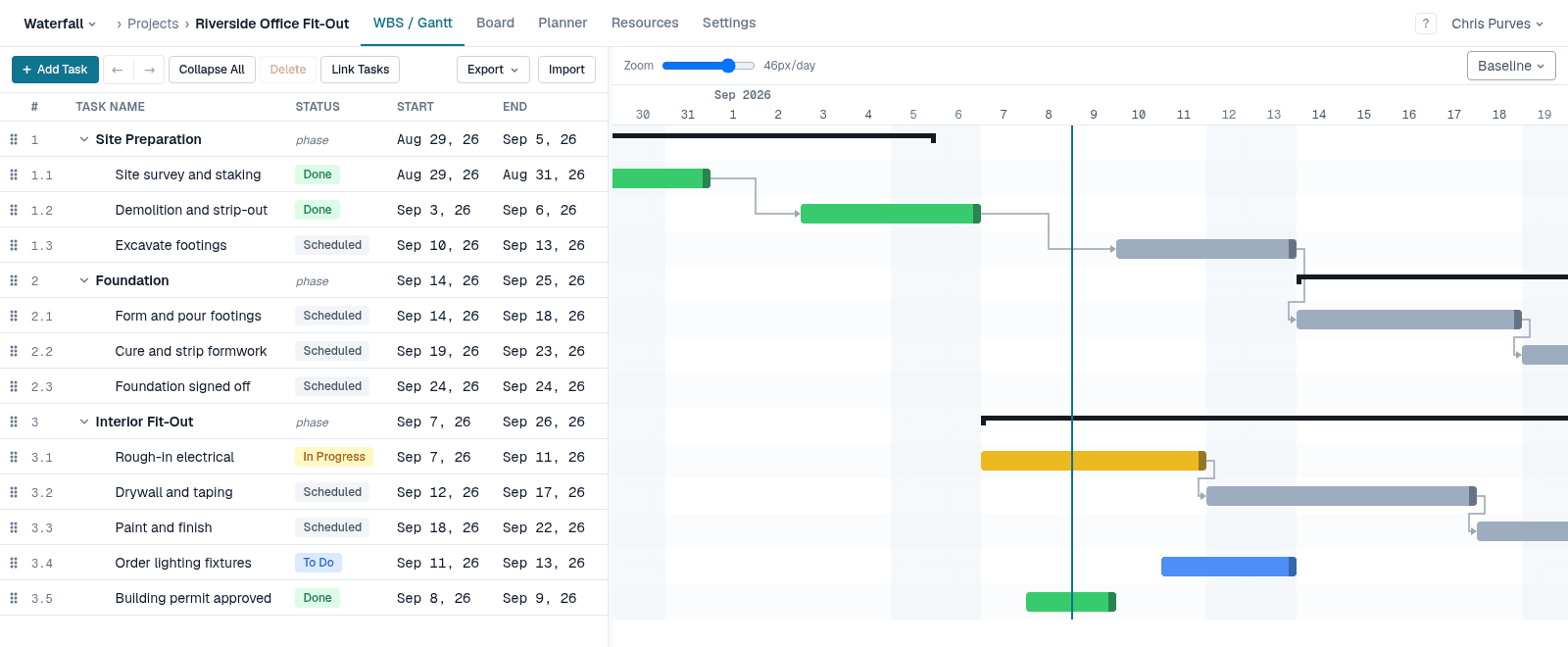
Smartsheet is a spreadsheet that does a great many things, and a Gantt chart is one of its views. Waterfall PM is the other way round: the plan — a work breakdown structure with dependencies, constraints and a critical path — is the product, and the board, team planner and notifications all hang off it.
If most of what you keep in Smartsheet is a project schedule, this page sets out where the two differ.
Side by side
What it is built around
- Waterfall PM
- A work breakdown structure that schedules itself
- Smartsheet
- Spreadsheet-style sheets, with Gantt as one view
Dependency types and lag
- Waterfall PM
- FS, SS, FF, SF with lag or lead, on every project
- Smartsheet
- FS, SS, FF, SF with lag or lead, once dependencies are enabled in the sheet's project settings
Moving a dependent task by hand
- Waterfall PM
- Dragging its bar sets a Start No Earlier Than constraint; the link and its lag are kept
- Smartsheet
- Typing a new date removes the predecessor from the row
Constraints and deadlines
- Waterfall PM
- All eight Microsoft Project constraints, plus deadlines that show every task feeding a miss
- Smartsheet
- No constraint types
Critical path
- Waterfall PM
- Always on, recomputed on every change
- Smartsheet
- Highlighted in the Gantt view
Baselines
- Waterfall PM
- Capture any number; show one against the live plan (Pro)
- Smartsheet
- Business plan and above
Who needs a paid seat
- Waterfall PM
- Only people who plan (PMs). Team members are always free
- Smartsheet
- Everyone who edits; free contributors can view, comment and respond to update requests
Team size
- Waterfall PM
- No member limit
- Smartsheet
- Pro plan caps at 10 paid members
Status and hand-offs
- Waterfall PM
- Finishing a task makes the tasks waiting on it ready, and emails people whose dates moved
- Smartsheet
- Built with automations and update requests
| Capability | Waterfall PM | Smartsheet |
|---|---|---|
| What it is built around | A work breakdown structure that schedules itself | Spreadsheet-style sheets, with Gantt as one view |
| Dependency types and lag | FS, SS, FF, SF with lag or lead, on every project | FS, SS, FF, SF with lag or lead, once dependencies are enabled in the sheet's project settings |
| Moving a dependent task by hand | Dragging its bar sets a Start No Earlier Than constraint; the link and its lag are kept | Typing a new date removes the predecessor from the row |
| Constraints and deadlines | All eight Microsoft Project constraints, plus deadlines that show every task feeding a miss | No constraint types |
| Critical path | Always on, recomputed on every change | Highlighted in the Gantt view |
| Baselines | Capture any number; show one against the live plan (Pro) | Business plan and above |
| Who needs a paid seat | Only people who plan (PMs). Team members are always free | Everyone who edits; free contributors can view, comment and respond to update requests |
| Team size | No member limit | Pro plan caps at 10 paid members |
| Status and hand-offs | Finishing a task makes the tasks waiting on it ready, and emails people whose dates moved | Built with automations and update requests |
Moving a task shouldn't cut a link
In Smartsheet, typing a new date on a task that a predecessor drives overrides the predecessor and removes it from the row — the plan quietly stops being connected at that point.
In Waterfall PM the link stays. Dragging a dependent task's bar pins it with a Start No Earlier Than constraint, the way Microsoft Project does, and its lag is never rewritten behind your back. If the work in front of it later slips, the task still moves out rather than pretending it can start on time.
Deadlines that point at the cause
Give a task a deadline or a “finish no later than” date and Waterfall PM flags it the moment the plan can't meet it — and every task that feeds the miss shows negative float, so you can see the chain that has to move, not just the task that crossed the line.
Built for the people doing the work
Everyone on the team opens the same plan, sees their work on a board, and moves it to In Progress and Done. Team members are free on every plan — you pay only for the people who plan.
When Smartsheet is the better choice
- Anything that isn't a schedule: formulas, forms, automations and data that just needs rows and columns.
- Reports and dashboards that roll up many sheets.
- A large ecosystem of integrations and enterprise administration.
Free while it's in beta
No credit card, every feature unlocked, and team members are always free. See pricing after the beta
Smartsheet details checked on September 29, 2026. Smartsheet is a trademark of Smartsheet Inc.; Waterfall PM is not affiliated with Smartsheet. Sources: Smartsheet Learning Center — Activate dependencies and use predecessors; Smartsheet Learning Center — Track the critical path in a sheet; Smartsheet pricing.