CompareWaterfall PM vs Microsoft Project
A Microsoft Project alternative that your whole team can use
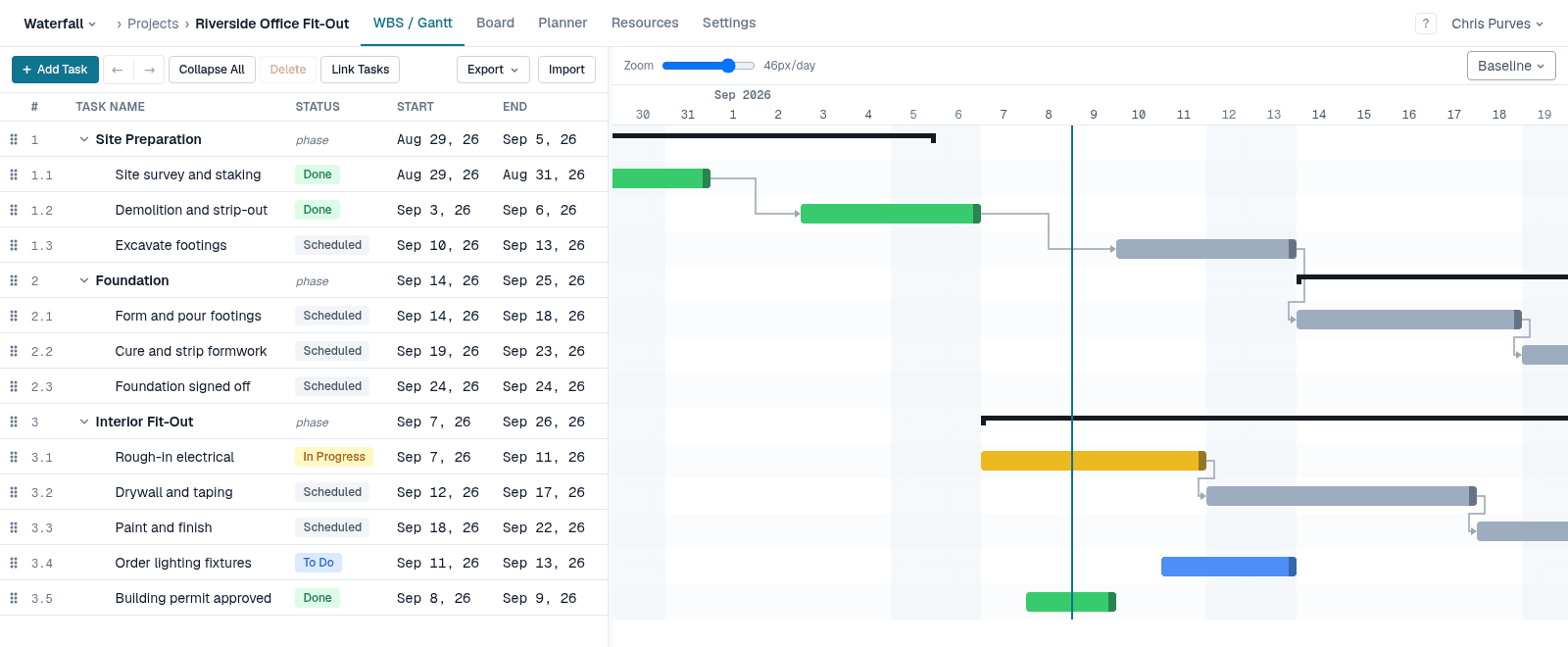
Microsoft Project is the reference tool for scheduling: dependencies, constraints, a critical path that recalculates as the plan changes. Waterfall PM keeps that model — deliberately, down to the constraint names — and puts it in a browser the whole team shares, alongside a board, a team planner and email updates.
If you have outgrown spreadsheets but a desktop scheduling tool feels like a plan only one person can touch, this page sets out where the two differ.
Side by side
Where it runs
- Waterfall PM
- Any modern browser — Windows, Mac, Linux, tablet
- Microsoft Project
- Desktop app for Windows only; browser access through Planner
Who needs a paid seat
- Waterfall PM
- Only people who plan (PMs). Team members are always free
- Microsoft Project
- Per-user subscriptions; the desktop scheduler needs Plan 3 or Plan 5
Work breakdown structure
- Waterfall PM
- Unlimited depth; phases roll up their children's dates
- Microsoft Project
- Unlimited outline levels with summary tasks
Dependency types and lag
- Waterfall PM
- FS, SS, FF, SF with positive or negative lag, typed as 1.2FS+3d
- Microsoft Project
- FS, SS, FF, SF with lead and lag
Constraints
- Waterfall PM
- All eight: ASAP, ALAP, SNET, SNLT, FNET, FNLT, MSO, MFO — plus deadlines
- Microsoft Project
- The same eight, plus deadlines
Automatic scheduling and critical path
- Waterfall PM
- Every change reschedules the whole plan and recomputes the critical path
- Microsoft Project
- Yes, for auto-scheduled tasks
Baselines
- Waterfall PM
- Capture any number; show one against the live plan (Pro)
- Microsoft Project
- Up to 11 stored baselines
Resources
- Waterfall PM
- Per-project pool, allocation percentages, work-based durations, and a team planner with workload bands (Pro)
- Microsoft Project
- Resource sheet, cost rates, calendars and resource leveling
Team collaboration
- Waterfall PM
- Kanban board, comments, watchers, and email when your dates move
- Microsoft Project
- Through Planner, Teams and SharePoint rather than in the desktop app
Getting a plan in
- Waterfall PM
- Spreadsheet import (CSV or Excel, Pro) in Waterfall's column layout; no .mpp import yet
- Microsoft Project
- Native .mpp files, plus Excel import
| Capability | Waterfall PM | Microsoft Project |
|---|---|---|
| Where it runs | Any modern browser — Windows, Mac, Linux, tablet | Desktop app for Windows only; browser access through Planner |
| Who needs a paid seat | Only people who plan (PMs). Team members are always free | Per-user subscriptions; the desktop scheduler needs Plan 3 or Plan 5 |
| Work breakdown structure | Unlimited depth; phases roll up their children's dates | Unlimited outline levels with summary tasks |
| Dependency types and lag | FS, SS, FF, SF with positive or negative lag, typed as 1.2FS+3d | FS, SS, FF, SF with lead and lag |
| Constraints | All eight: ASAP, ALAP, SNET, SNLT, FNET, FNLT, MSO, MFO — plus deadlines | The same eight, plus deadlines |
| Automatic scheduling and critical path | Every change reschedules the whole plan and recomputes the critical path | Yes, for auto-scheduled tasks |
| Baselines | Capture any number; show one against the live plan (Pro) | Up to 11 stored baselines |
| Resources | Per-project pool, allocation percentages, work-based durations, and a team planner with workload bands (Pro) | Resource sheet, cost rates, calendars and resource leveling |
| Team collaboration | Kanban board, comments, watchers, and email when your dates move | Through Planner, Teams and SharePoint rather than in the desktop app |
| Getting a plan in | Spreadsheet import (CSV or Excel, Pro) in Waterfall's column layout; no .mpp import yet | Native .mpp files, plus Excel import |
The same scheduling model, on purpose
Dragging a bar in Waterfall PM sets a Start No Earlier Than constraint, exactly as it does in Microsoft Project — it never quietly rewrites the lag on a link. Hold Shift to Must Start On a date instead, or Alt to retime the link itself. Successors cascade the way you expect.
The “no later than” constraints and deadlines flag a date instead of dragging a task in front of its own predecessors. The tasks that would have to move to meet it show negative float, so you can see the whole chain that is making you late — not just the one task that crossed the line.
Predecessors are written the way Microsoft Project writes them: 1.2FS+3d, 4SS, 7FF-1d.
One plan the whole team can open
In Waterfall PM the people doing the work open the same plan as the person who built it. They see their tasks on a board, move them to In Progress and Done, and comment in place. Finish a task and the tasks waiting on it become ready on their own; anyone whose dates moved gets an email saying so.
Team members are free — on every plan, now and after the beta. You pay only for the people who plan.
If you are leaving Project Online
Microsoft set September 30, 2026 as the retirement date for Project Online, and points its customers to Planner, Project Server Subscription Edition or Project Operations. If what you actually relied on was the scheduling engine — dependencies, constraints and a critical path — Waterfall PM is built around exactly that, in the browser, without a server to run.
When Microsoft Project is the better choice
- Resource leveling, cost rates and budget tracking — Waterfall PM tracks allocation and workload, not money.
- Comparing several baselines side by side; Waterfall PM shows one at a time.
- Custom fields, built-in reports and portfolio management across many projects.
- Opening and saving .mpp files directly, and working offline.
Free while it's in beta
No credit card, every feature unlocked, and team members are always free. See pricing after the beta
Microsoft Project details checked on September 29, 2026. Microsoft Project is a trademark of Microsoft Corporation; Waterfall PM is not affiliated with Microsoft. Sources: Microsoft 365 Message Center MC1478955 — Project Online retires on September 30, 2026; Microsoft Q&A — Project Plan 3 desktop client on macOS.